

Reddit Ads for SMBs
Improving the Reddit Ads experience for small businesses.
During my 2023 summer internship on the Ads Product Design team, I worked on three projects across the Measurement, Growth, and Reporting teams. I owned end-to-end design for two projects aimed at reducing friction in the ad creation and measurement experience for SMB advertisers — an Image Scraper for Ad Creative and a redesigned Reddit Pixel Event Setup flow. For more on the internship experience, I wrote a fun blog post here.
Understanding the User: SMBs
Small businesses (SMBs) are a critical but underserved segment of Reddit’s advertising ecosystem. SMB advertisers are often solo operators or small teams juggling multiple responsibilities. They don’t have dedicated marketing departments, design resources, or deep technical expertise. This shapes everything about how they interact with ad platforms. They need tools that are fast, intuitive, and require minimal overhead.
This user context grounded both projects: every design decision was evaluated against the question of whether it would make sense to a time-constrained business owner, not a seasoned digital marketer.
Project 1: Image Scraper for Ad Creative
Problem
“Ad creation seems intimidating and hard, and I don’t have time for that.”
One of the biggest drop-off points in the SMB ad creation funnel was the creative step. Uploading images required advertisers to have ready-made assets, which many small businesses simply don’t have on hand. The friction of sourcing and formatting images was a real barrier to campaign creation.
Design challenge
How might we leverage the content that small businesses already have, streamlining their ad creation process?
Design iterations
We sought to create an automated image scraper that pulls images directly from the small business’s existing website URL — no asset preparation required. Several ideas were explored across iterations:
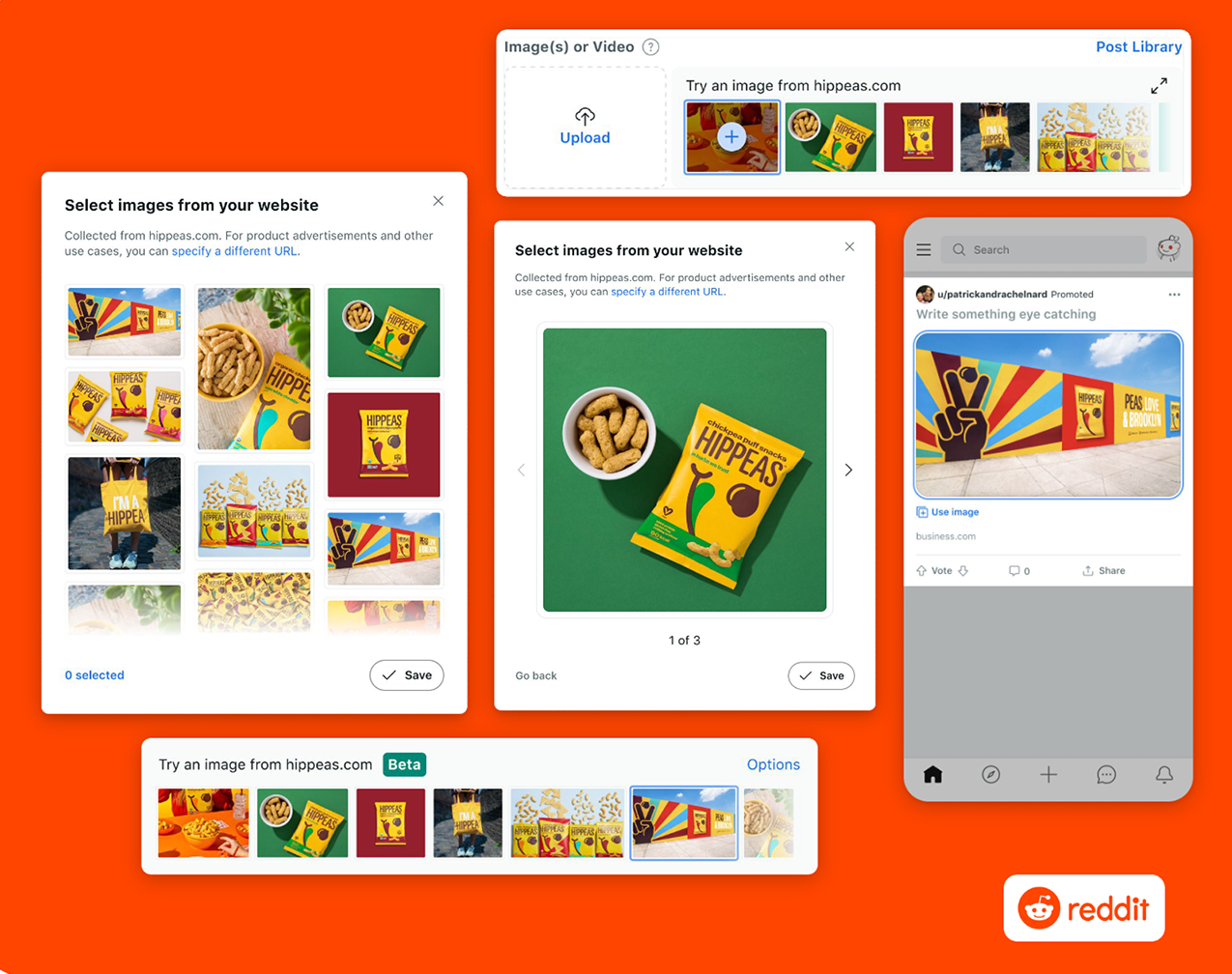
Design iterations for the image scraper.
- Form factor: Where should the image picker live relative to the ad creation flow? Popover? Modal? Inline?
- Inline upload field + image picker: How could the scraper and the existing upload flow be combined into one component?
- Pagination vs. scroll: How should users browse scraped images?
- Functional preview: How should users preview the scraped image as a real ad?
Design solution
Main view: The scraper automatically pulls images from the business URL entered earlier in the flow. Users see a horizontal carousel of options as soon as they load the page, inline with the previous upload field. They’re immediately motivated to select from their own pre-curated content, lowering the barrier to creating their first ad. I also incorporated key copy and scrolling hints, as well as icons to distinguish scraped images from manually uploaded assets.
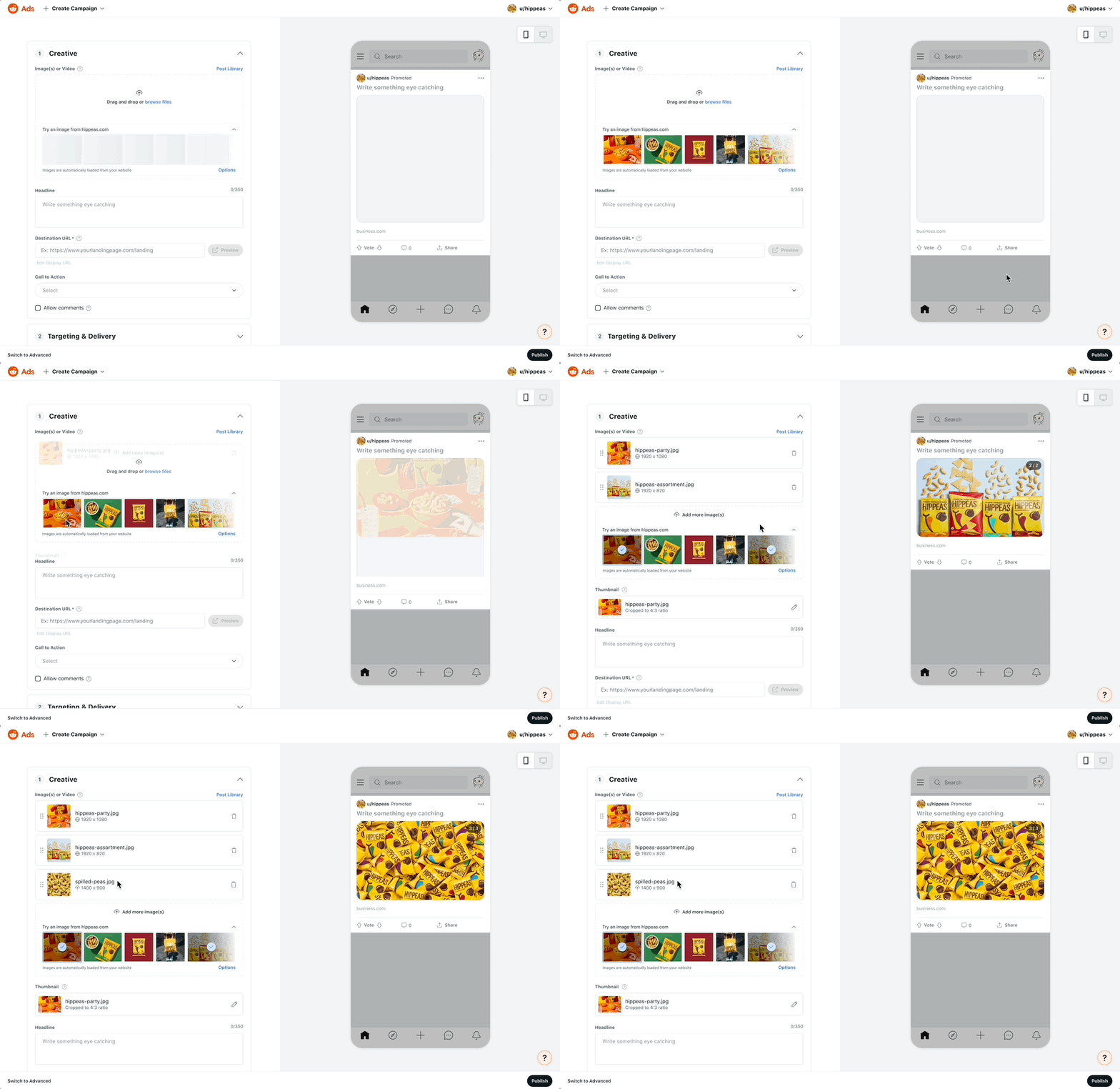
Main user flow.
Options panel: For users who want more control, an expanded side panel offered:
- The ability to change the source URL
- Keyword search to filter images
- Support for both images and video
- Batch selection across assets
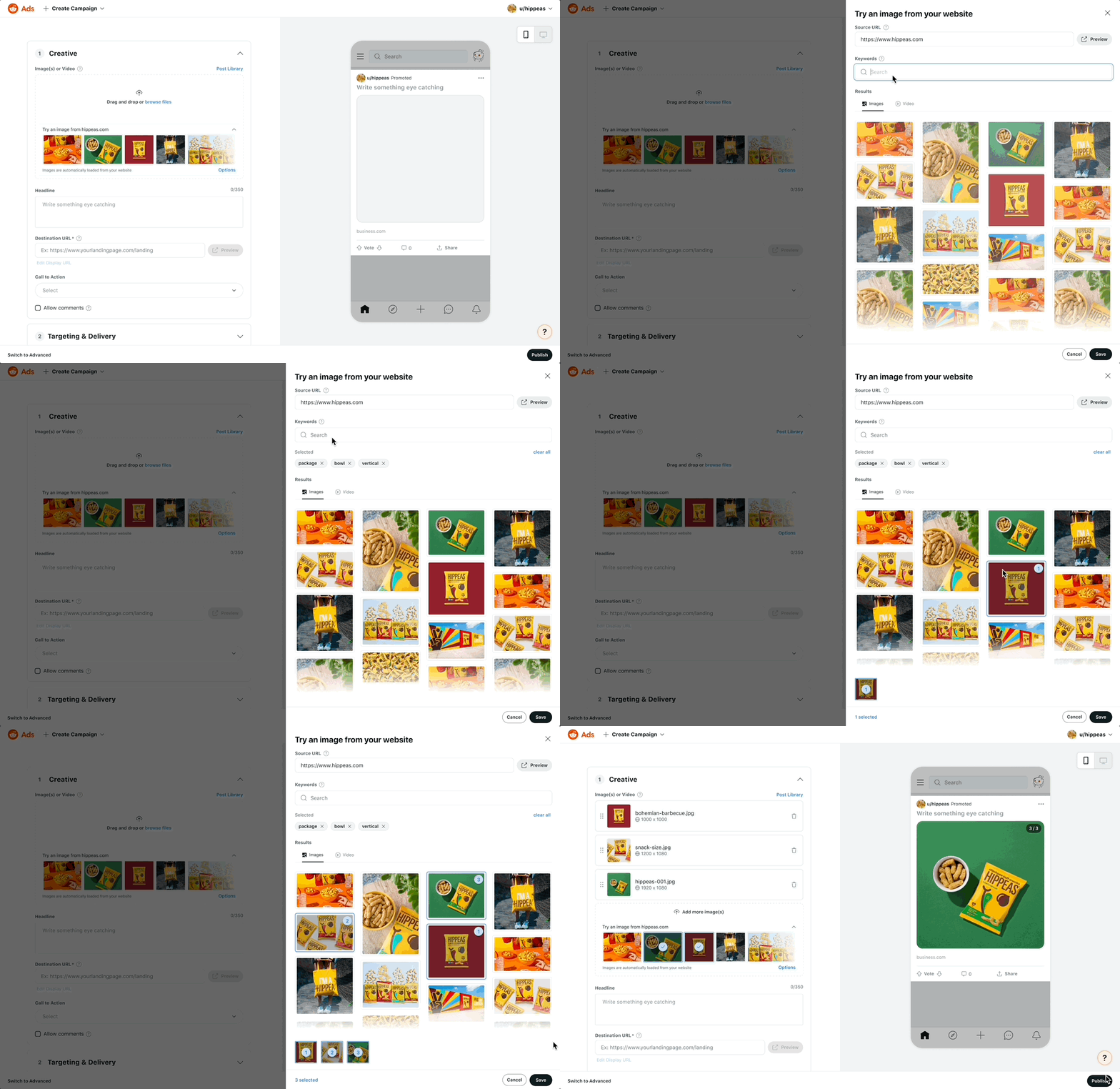
Options panel flow.
Image editing: A new edit icon on each scraped image opens a cropping and adjustment modal. I incorporated this key feature because the content is automatically scraped, and users would likely have to make adjustments compared to how the media is viewed on their website. This added customizability without cluttering the default experience, and was designed to scale to more editing features over time. It also works on manually uploaded images, extending capabilities of the existing flow.
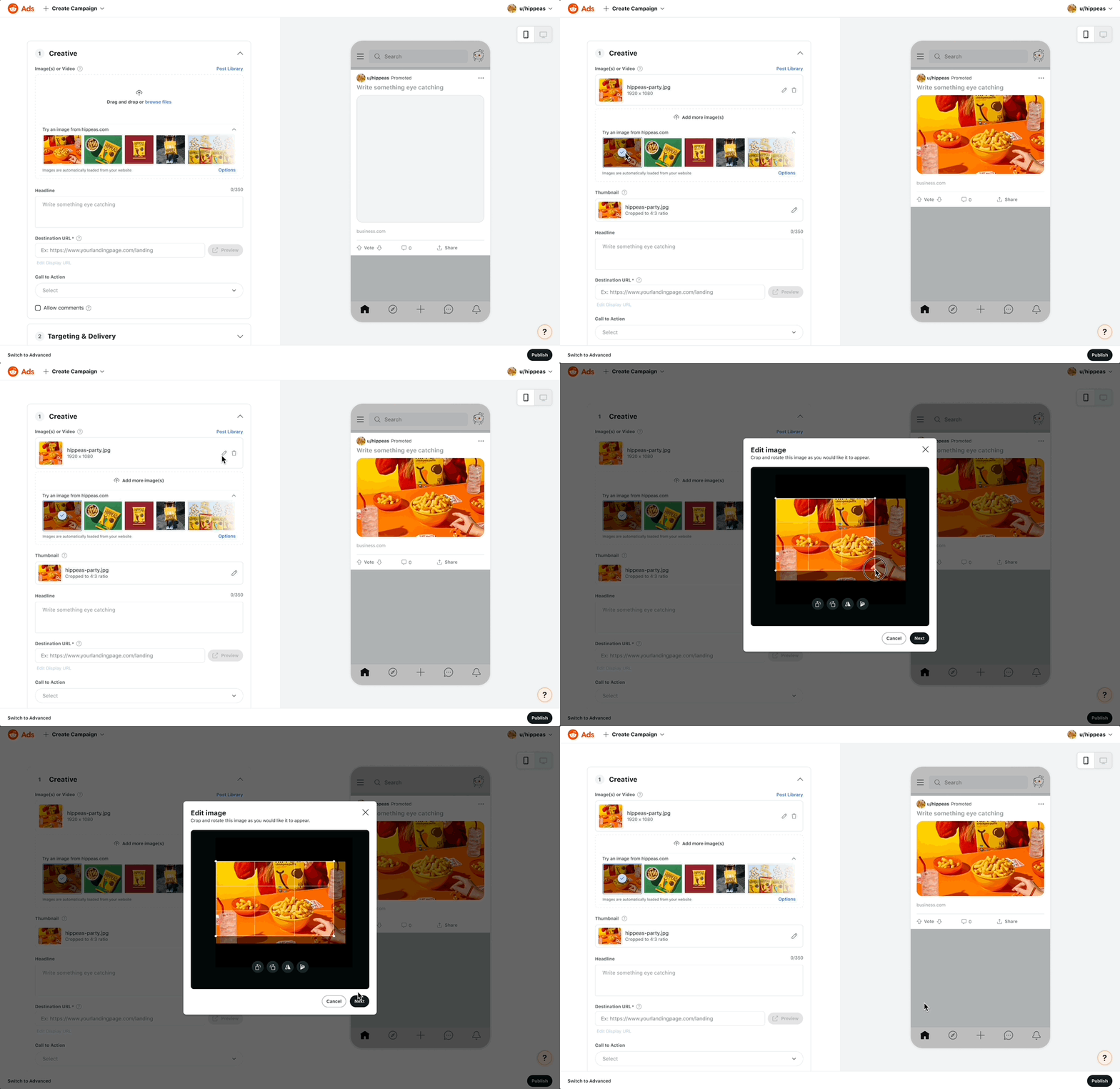
Edit image flow.
Feature status
The feature is still live today (2026!) as part of the Simple create campaign flow. You’ll need to create a Reddit Business account to play with it live :)
Project 2: Reddit Pixel Event Setup
Background: What is the Reddit Pixel?
The Reddit Pixel is a JavaScript snippet placed on an advertiser’s website that tracks conversion events — clicks, purchases, searches, and more. It’s one of the most powerful tools for advertisers to measure ROAS (return on ad spend) and optimize campaigns over time. Think of it like an email read receipt, but for your website.
Problem
The existing flow required advertisers to manually write or copy-paste code to define conversion events, a significant ask for non-technical users. From conducting interviews with SMB advertisers, we surfaced key pain points with the existing Pixel setup. Three themes emerged:
- Lack of help resources: 7 of 10 advertisers wanted a better Pixel onboarding help center
- Delayed implementation: if managed SMBs didn’t set up the Pixel within about 3 weeks, they tended to churn
- Lack of trust: 4 of 10 saw large discrepancies in their Reddit Pixel reporting data
These findings made clear that the Pixel setup process needed to be faster, more guided, and more transparent.
Design challenge
How might we simplify pixel setup for non-technical users?
Design iterations
We sought to create a no-code, point-and click event builder to allow small business to define conversion events by directly interacting with their own website. Two other directions were explored before we landed on the final design:
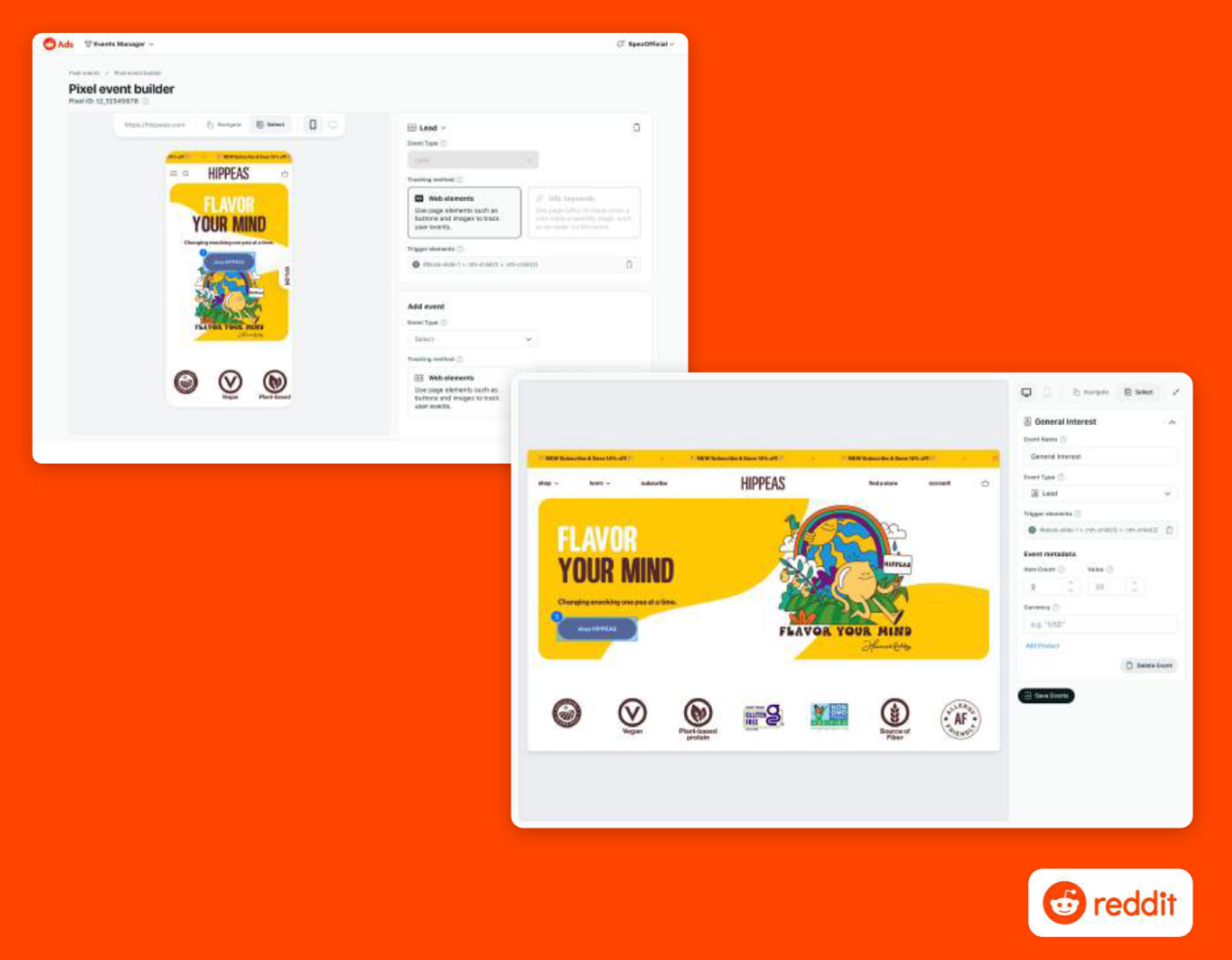
Design iterations for the image scraper.
- V1: Side-by-side preview — A split-screen interface modeled after TikTok’s interactive editor, showing the advertiser’s site alongside a configuration panel
- V2: Sandbox illusion + side panel — A fullscreen view of the advertiser’s site with a floating panel, creating the feeling of working directly within the site V2 was carried forward for its immersive quality and reduced cognitive load.
Design solution
Base code setup: The Pixel base code installation step was reimagined as a full-page wizard, walking users through each step in sequence rather than presenting a wall of technical documentation.
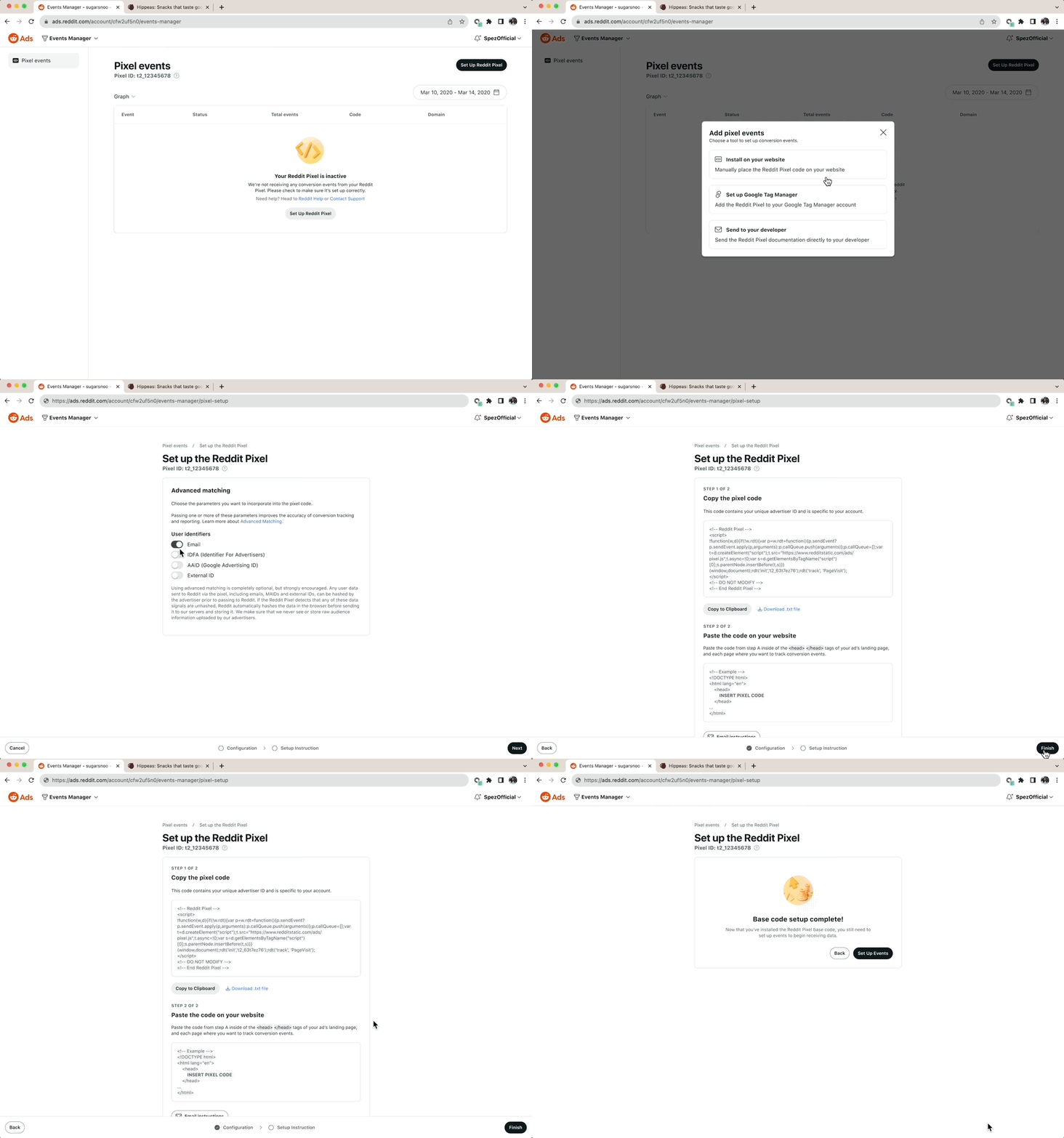
Base code setup flow.
Web element event setup: The core innovation: a browser extension-like interactive widget that opens the advertiser’s website in a new tab. Users simply point and click on any page element (a button, image, or link) to tag it as a tracked event. This eliminated the most common source of implementation errors.
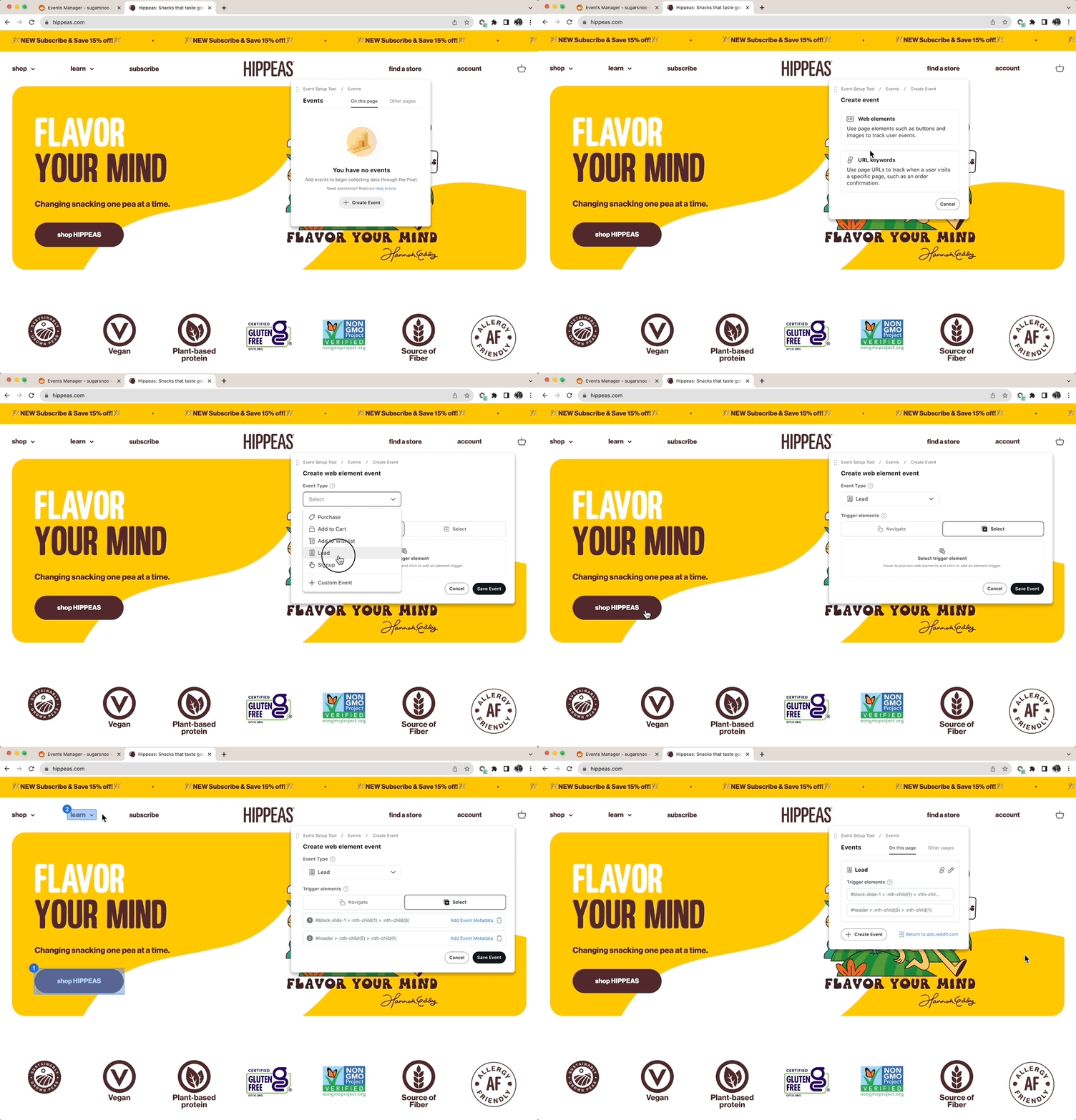
Point-and-click web element event setup flow.
Event metadata: After selecting an element, users configure what to track, e.g. purchase value, product name, and currency. Dynamic element support was built in to enable smart event creation across product types.
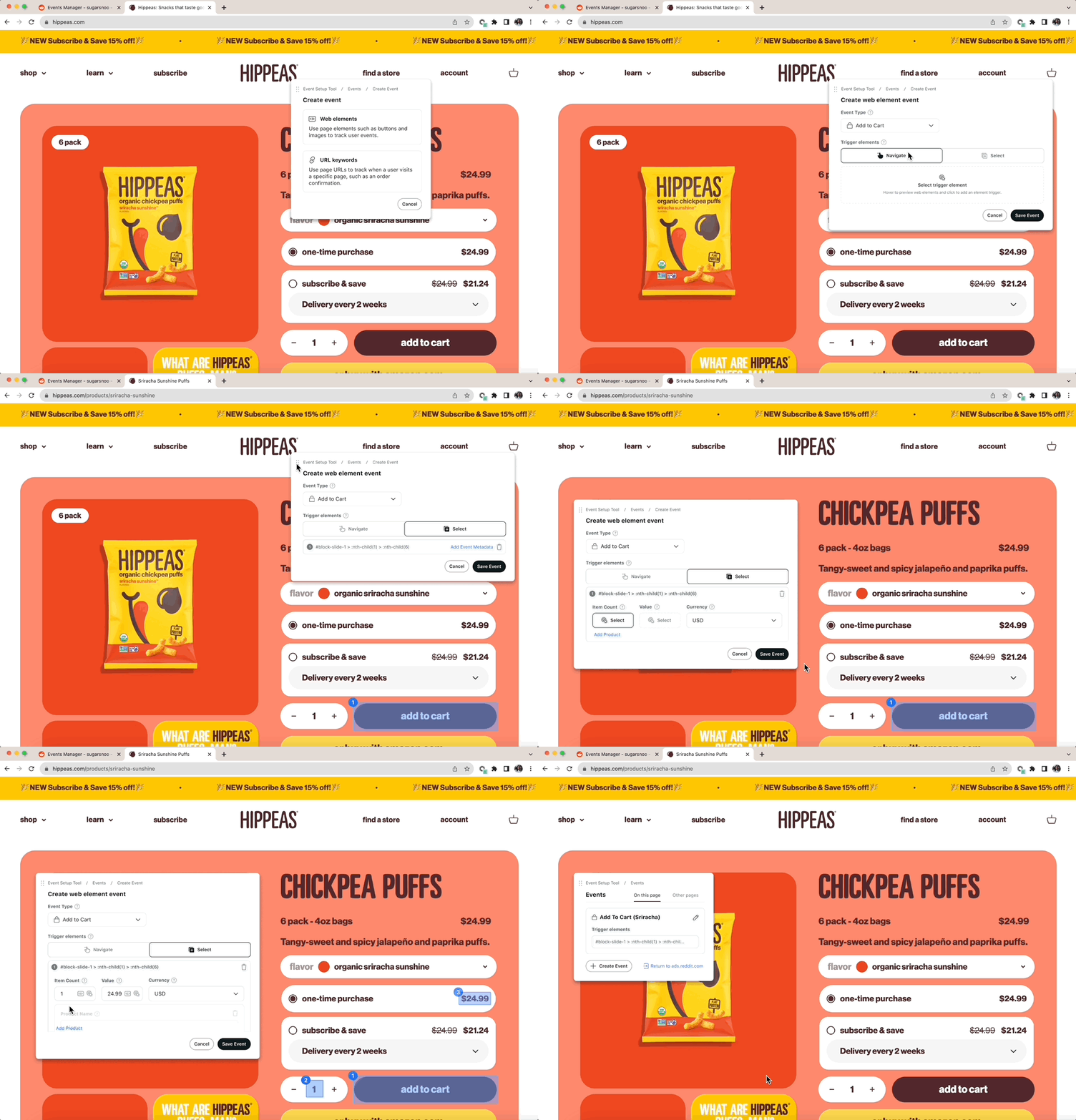
Adding event metadata flow.
URL keyword event setup: For page-visit tracking (e.g., order confirmation pages), users could match on a full URL or define keyword patterns. The current browser URL was offered as a default to reduce manual input and errors.
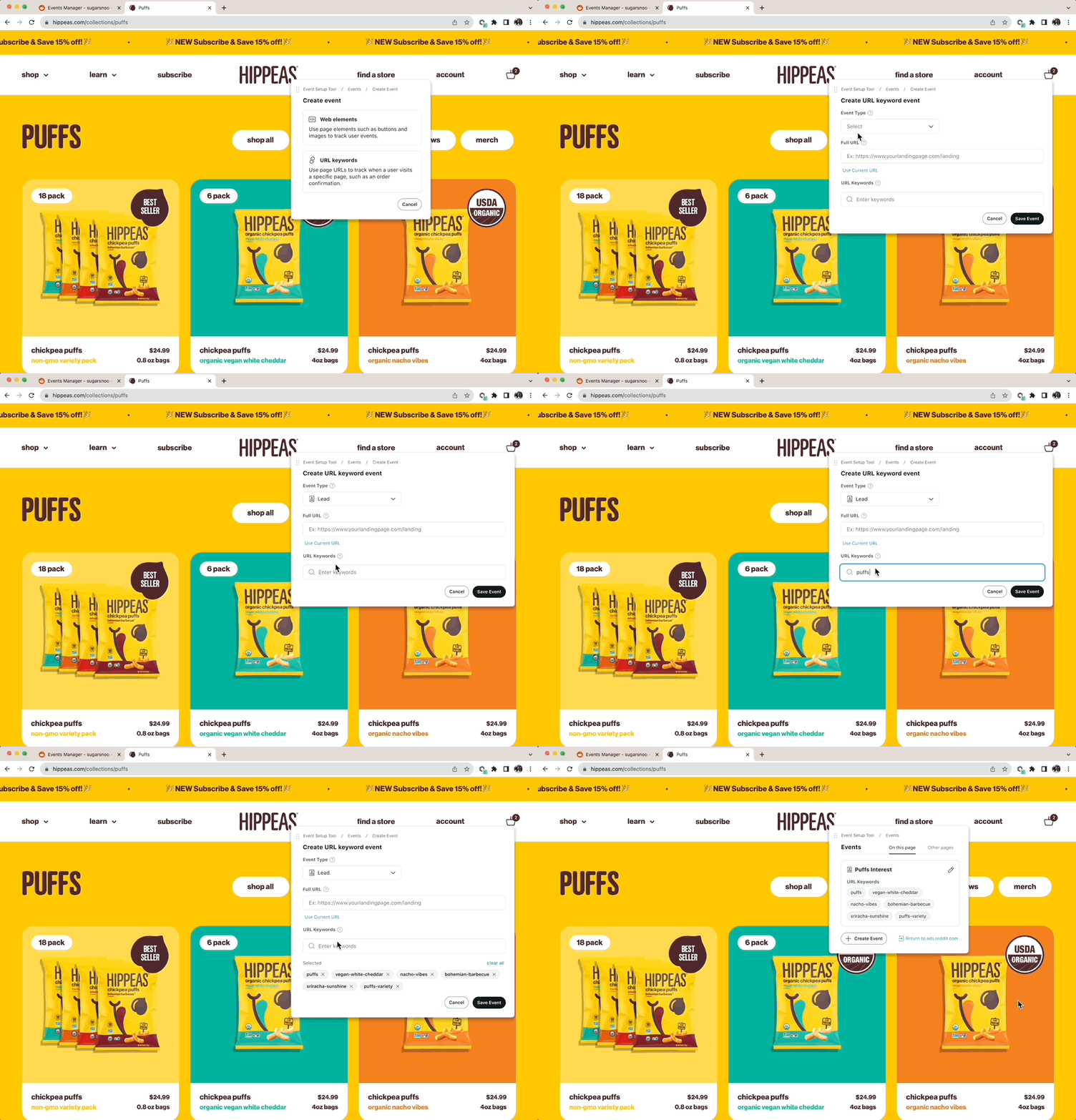
URL keyword event setup flow.
Reflection
Working under a tight deadline → stronger collaboration with engineers: Getting engineers involved earlier in the design process helped to surface technical constraints before they became blockers.
Technical constraints → learning to adapt designs flexibly: Some design directions weren’t feasible given the engineering architecture or timeline. Learning to hold design intent loosely and adapt the execution without losing the core user value was a key skill that I developed over the summer.
Emphasis on interactive prototypes: Static Figma mocks sometimes failed to convey the intended interaction, especially for the interactive Pixel event builder. High-fidelity interactive prototypes became the standard handoff format, dramatically reducing misinterpretation.
This internship was my first experience designing within a large design team and a cross-functional product organization. I learned how to work across two various teams, navigate different problem spaces, utilize research methodologies, and and understand stakeholder dynamics.